Pencil Sketch Photo Editor
- 4.3
- Rating
- 10.00M
- Installs
- Free
- Price
 Analysis by App-foxy
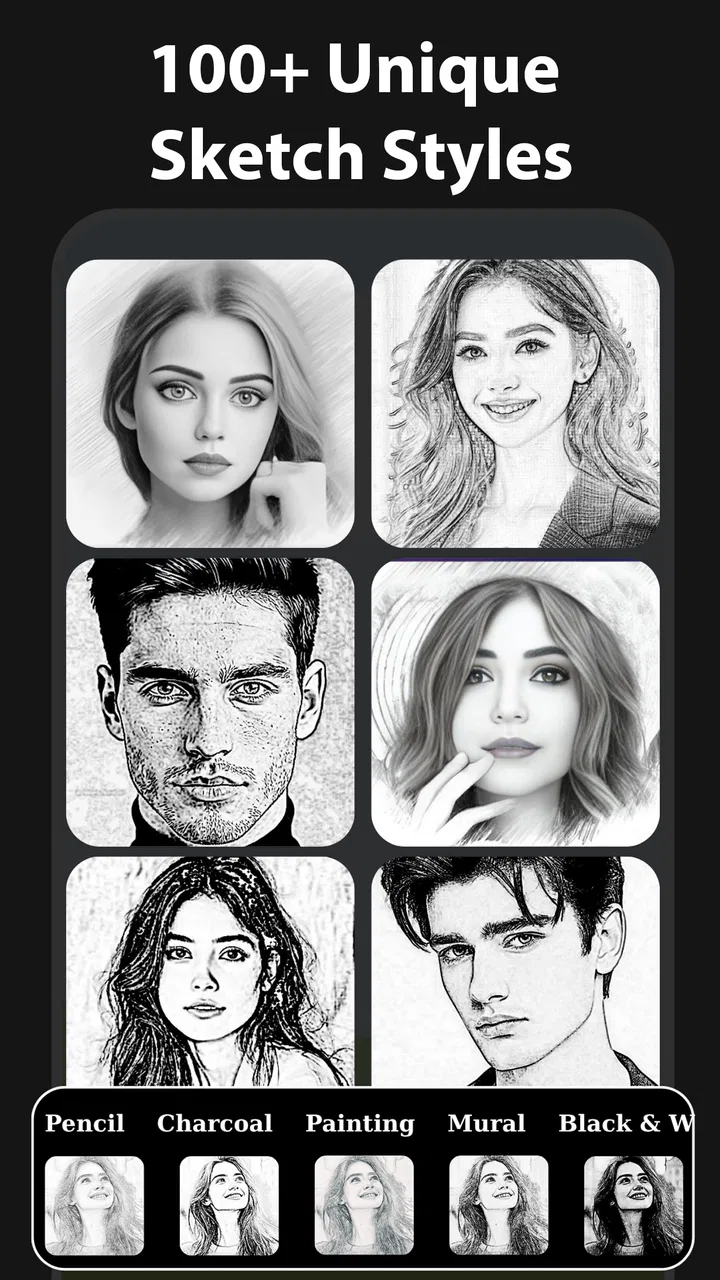
I approached Pencil Sketch Photo Editor as a quick creative tool rather than a complete photography studio, and that distinction matters. Its main appeal is simple: it turns an ordinary photo into a pencil-style image without asking me to understand complicated editing controls first. After spending time with it, my view is that it works best when I want a recognizable sketch effect quickly, especially for profile pictures, casual gifts, social posts, or a small personal project. It is less convincing as a replacement for a full editor when I need precise retouching, layered composition, or detailed control over every part of an image.
The app sits in the photography category and is developed by Maxlabs Photo Editor. It is free to install, with optional purchases ranging from $2.99 to $39.99 per item. That makes it easy to try without committing money immediately, although anyone who dislikes upgrade prompts or paid extras should pay attention while moving through the editing experience. The age rating is Everyone, so its basic positioning is broad and accessible rather than aimed at professional photographers.
What the sketching workflow feels like in everyday use
The first thing I noticed is how focused the experience is. Instead of presenting itself as an enormous toolbox, Pencil Sketch Photo Editor centers the process around choosing an image and giving it a drawn appearance. That narrow purpose is a strength for people who already know what they want. I do not have to spend time deciding whether to begin with curves, masks, color grading, or a complicated layer system. The creative decision comes first: select a photo, try a sketch treatment, and judge whether the result feels right.
You May Also Like

 Google Keep - Notes and lists
Google Keep’s Quiet Growth Shows the Appeal of Simpler Notes
As mobile work gets busier, Google Keep keeps winning a simple contest: capture a thought quickly, find it later, and get on with the day.

 Blood Strike: 2.5 Anniversary
Blood Strike’s Loadouts Turn Every Drop Into a Tactical Gamble
A close look at Blood Strike’s custom loadouts: how fast access to signature weapons reshapes its battle royale rhythm, rewards preparation, and narrows the gap between fights.

 Pandora - Music & Podcasts
Pandora’s Music Is Easy to Start, but Harder to Recover
Pandora’s strength is its low-effort path from a seed to a station. Its weak spot is how much confidence it asks you to place in connection, setup, and quiet recovery.

 8 Ball Pool
 Is Built on Rivalries, Rematches, and Routine
A close look at the rivalries, rematches, shared routines, and unanswered safety questions that turn a quick pool match into a persistent mobile community.

 Samsung Music
’s Quiet Strength Is Playing What You Already Own
Its reach comes less from spectacle than from dependable access to a personal library. That simplicity is both the app’s strongest retention engine and its ceiling.

 AccuWeather: Weather Radar
AccuWeather Review: A Quick, Clear Forecast for Everyday Decisions
For everyday plans, the best forecast is the one you can understand quickly. AccuWeather makes rain timing, radar, and local conditions easy to act on, with a few trade-offs.
More From Our News Desk



For a normal day-to-day example, imagine taking a picture of a friend at a café and wanting something more personal than the original camera image. I could use the app to create a pencil-like version, compare the result with the source, and save the more expressive interpretation for a message or social post. The process is especially suitable for portraits, pets, buildings, and objects with clear outlines. Those subjects give the effect enough structure to look intentional instead of muddy.
The strongest results usually come from images with good separation between the subject and its surroundings. A face with visible lighting and a reasonably clean background gives the sketch treatment recognizable edges to work with. A dark photograph containing several overlapping objects is a harder test. In that situation, lines can compete with one another, and the final image may look busy rather than hand-drawn. My practical advice is to choose the source image carefully before blaming the filter. The input often determines whether the result feels artistic or merely processed.
I also found that a sketch effect is not automatically improved by making every line stronger. A lighter treatment can preserve the expression in a portrait, while an aggressive effect may emphasize skin texture and small distractions. When I wanted a more believable drawing, I preferred restraint over maximum intensity. This is one of the app’s useful creative trade-offs: the fastest preset may be attractive at first glance, but a softer interpretation can work better when the image is meant to be shared or printed.
That makes the app approachable for beginners. Someone who has never used a photo editor can understand the central idea immediately. It also makes it useful as a first step for more experienced users. I can create a sketch-style base here, then move the result into another editor for cropping, typography, collage work, or color adjustments. In that role, the app is not trying to finish every project; it supplies a particular visual starting point.
Where the pencil effect earns its place
The most convincing use case is a portrait that benefits from simplified detail. A pencil treatment can make a familiar face feel more like an illustration, particularly when the original photo has clear eyes, hair contours, and directional light. I would also consider it for a pet photo, where fur patterns and a strong silhouette can translate nicely into line-based artwork. Architecture is another sensible choice because windows, rooflines, and edges give the effect natural material to describe.
There is a subtle advantage in using a dedicated sketch app instead of searching through a general editor’s long filter menu: the visual result remains the purpose of the session. In a broad photo editor, I may become distracted by dozens of unrelated adjustments. Here, I can concentrate on whether the image communicates the handmade quality I want. That focus is valuable when the goal is not technical perfection but a quick change in mood.
One workflow I found practical was to keep the original image untouched and treat the sketch version as a separate interpretation. That sounds obvious, but it prevents a common mistake: editing the only copy and then discovering that the effect does not suit the image after all. I would also compare the sketch against the original at a smaller display size. If the subject is still readable when viewed as a thumbnail, the conversion is more likely to work in a profile image or feed post.
Another useful approach is to start with a tightly framed crop. Pencil effects can lose impact when the subject occupies only a small part of a wide photograph. Cropping first gives the lines a clearer role and makes the final image feel more deliberate. For a face, I would leave enough space around the head to avoid an awkward edge; for an object, I would remove empty areas that do not contribute to the drawing. This is not a hidden button or a technical trick, but it is the kind of preparation that makes the app look much better in practice.
It is also worth remembering that a sketch is an interpretation, not a faithful record. If I need accurate colors, exact texture, or a natural-looking correction, I would choose a conventional photo editor instead. The app’s value comes from changing the visual language of the image. That is why it can feel successful even when it does not preserve every photographic detail.
The limitations I would want to know first
The focused design has a clear downside: it may feel restrictive once I want to go beyond the central pencil concept. A person looking for a full editing workstation may expect detailed retouching, sophisticated selections, layered artwork, or fine-grained control over individual tonal ranges. Pencil Sketch Photo Editor is not the app I would choose for that kind of job. Its appeal depends on accepting a guided, effect-led workflow rather than demanding complete manual control.
There is also a quality gap between different source images. A filter can produce a pleasant result from a clean, well-lit photograph and a disappointing one from a compressed, blurry, or cluttered image. This means the app cannot rescue every weak photo. If the original has little contrast or an unclear subject, the pencil treatment may simply make the lack of definition more visible. I would test several images before deciding whether the style suits my project.
The free entry point is helpful, but optional purchases are part of the experience. The listed individual purchase amounts run from $2.99 to $39.99, so I would not assume that every possible option is included at no cost. Anyone installing it for a single quick edit should check what is available during the process and decide whether the free tools are enough. For occasional users, that may be perfectly reasonable. For people who want a broad collection of premium creative tools, the upper end of the purchase range deserves consideration before spending.
I would also avoid judging the app solely by a preview that looks impressive at first glance. Sketch effects often seem stronger when viewed briefly than when examined closely. Zooming in can reveal uneven lines, lost facial detail, or a background that distracts from the subject. My recommendation is to inspect the eyes, hair, and high-contrast edges before saving a final version. If those areas remain clear, the image is more likely to hold up outside the editor.
Another limitation is stylistic repetition. If I use the same treatment on every photo, the results can begin to look interchangeable. The app works better when I choose it for images that genuinely benefit from a drawn appearance. A colorful travel picture may be more effective with a traditional adjustment that preserves atmosphere, while a simple portrait may gain character from the pencil conversion. The right question is not whether the effect is attractive in isolation, but whether it improves this particular photograph.
How it compares with broader photography apps
Compared with a general-purpose photo editor, this app is quicker to understand and more focused on one recognizable outcome. That is a real advantage for casual users who do not want to learn a large interface. A broad editor will usually be a better choice when I need exposure correction, selective edits, text, collages, or a repeatable professional workflow. It gives me more room to solve different problems, but it also asks me to make more decisions.
Compared with drawing software, Pencil Sketch Photo Editor is more convenient for converting an existing photograph than for creating an illustration from a blank canvas. A drawing app is preferable when I want to control every stroke, build layers, or manually trace a subject. This app is better when the source photo already contains the composition I like and I simply want to reinterpret it. That difference makes the choice fairly straightforward: photo conversion here, original drawing elsewhere.
It also occupies a middle ground between a one-tap novelty filter and a serious editing suite. The result can feel more purposeful than a random visual effect because the pencil style has a clear artistic identity. At the same time, I should not expect the depth of a desktop illustration program. For a phone-based, occasional transformation, that compromise is sensible. For commissioned artwork or exact reproduction, it is not the tool I would rely on alone.
The app has been available since November 11, 2018, and its current version is 2.1.7. It supports devices running Android 7.0 or later. Those details make it accessible to people using older compatible phones, although the experience can still depend on the device and the size of the image being processed. I would keep the original file available and allow a little patience if an especially large photograph takes longer to handle.
Who should install it, and who should skip it
I think this is a good fit for someone who wants an uncomplicated way to make portraits, pets, objects, or scenery look hand-drawn. It is particularly suitable for beginners, casual creators, students working on a visual idea, and anyone who wants a distinctive image without learning a complex editing system. The free installation makes experimentation easy, and the Everyone rating reinforces its broad, family-friendly positioning.
It may also suit a person who regularly creates small personalized gifts. A sketch-style image can work as a message attachment, a simple card design, or a visual keepsake. I would still finish the layout in another app if I needed text or multiple images, but this tool can handle the transformation that gives the project its character.
I would skip it if my main goal is professional retouching, accurate color work, detailed compositing, or a fully manual illustration. I would also look elsewhere if I dislike effect-based editing or want one application to manage every stage from camera correction through final design. In those cases, a broader photography editor is likely to be a better investment of time, even if its interface takes longer to learn.
The app has a substantial user base, with more than ten million installs, and its average rating is 4.3 from roughly sixty-five thousand ratings. Those figures suggest that the central idea is connecting with many people, but they do not remove the need to test the workflow against my own photos. A popular effect can still be wrong for a particular style or project. I would treat the broad adoption as encouragement to try it, not as a guarantee that every result will look polished.
My verdict after using it
Pencil Sketch Photo Editor succeeds because it does not make its main promise complicated. I can take a familiar image and give it a pencil-inspired identity with relatively little effort. The best results come from thoughtful source selection, moderate intensity, and a willingness to crop or prepare the photo before applying the effect. Those small choices matter more than simply pressing the strongest-looking option.
Its weaknesses are the natural cost of that focus. It is not a complete replacement for a serious photo editor, and the quality of the conversion varies with lighting, contrast, composition, and subject detail. The optional purchases also mean that free access should not be confused with unlimited access to every possible creative option. I would approach it as a specialized tool, not as an all-purpose studio.
For a friend who wants quick pencil-style portraits or playful image transformations, I would recommend giving it a try. I would suggest keeping expectations realistic, comparing the result with the original, and using another editor afterward when the project needs text, layout, or precise corrections. The clearest reason to choose it is speed with a recognizable artistic result, not deep editing control. With that expectation, it is a useful and approachable photography app; without it, someone seeking a complete creative workspace will probably feel limited.
FAQs for Pencil Sketch Photo Editor
01What is Pencil Sketch Photo Editor?
Pencil Sketch Photo Editor is an app that transforms your photos into artistic sketches. It offers various filters and tools to give your images a hand-drawn look, resembling pencil sketches. With user-friendly features, it allows anyone to create stunning artistic effects with just a few taps.
02Is Pencil Sketch Photo Editor free to use?
Yes, Pencil Sketch Photo Editor offers a free version with basic features. However, for advanced tools and additional effects, there may be in-app purchases. These premium options can enhance your photo editing experience by providing more creative control and variety.
03What are the system requirements for Pencil Sketch Photo Editor?
Pencil Sketch Photo Editor is compatible with both Android and iOS devices. For Android, it typically requires version 5.0 or higher. For iOS, it usually supports iOS 11.0 or later. Ensure your device meets these requirements for optimal performance of the app.
04Can I share my edited photos directly from the app?
Yes, Pencil Sketch Photo Editor allows you to share your creations directly from the app. Once you've edited your photo, you can easily upload it to social media platforms like Instagram, Facebook, or Twitter, or send it via email or messaging apps to friends and family.
05How user-friendly is Pencil Sketch Photo Editor for beginners?
Pencil Sketch Photo Editor is designed with a user-friendly interface, making it accessible for beginners. The app provides intuitive navigation and straightforward tools, allowing users with little to no photo editing experience to create beautiful sketches with ease. Tutorials and tips are also available to assist new users.
Pros
- User-friendly interface for easy navigation.
- Offers a wide range of artistic filters.
- High-quality output with detailed sketches.
- Fast processing without lagging issues.
- Supports high-resolution images for editing.
Cons
- Limited free features without in-app purchases.
- Occasional ads may disrupt the user experience.
- Some filters require a premium subscription.
- Lacks a tutorial for beginners.
- No option for batch processing images.

Pencil Sketch Photo Editor
Gallery